Daily operations
Cash out: paying for things from the drawer
Record money that leaves the till mid-shift — the owner's pocket, a one-off, a supplier paid in cash — so the drawer is not short at close and the payment lands in the right place in your reports.
7 min read · Updated September 1, 2026
Halfway through service the supplier arrives with two sacks of rice and wants ₱1,800 in cash. You pay him out of the till, because that is where the money is. At close the drawer counts ₱1,800 short, nobody remembers why, and the cashier who happened to be on duty wears it.
Cash Out is the thirty seconds that prevents all of that. It records that money left the drawer, subtracts it from the cash the system expects to find, and files the payment under what it actually was.
For the rice, though, you will not use this page. Stock and bills paid from the till are recorded where the stock and the bill are recorded — and they write the same drawer payout for you. That route is below. Cash Out itself is for the money that is nothing but money leaving the box.
Record a cash out
Go to POS → menu → Cash Out. Every account can reach it, including cashiers with no other permissions — the drawer goes short whether or not the person holding the cash is allowed into reports.
Fill in:
- Amount — what physically left the drawer.
- What was it for — one of the two types below.
- Paid to (optional) — the person who took the money.
- Note (optional) — what it was for.
Then tap Record Cash Out. The entry appears under Paid out today at the bottom of the same screen, with the time and who recorded it.
The two optional fields are optional in the way a receipt is optional. "₱2,000" tells you nothing next month. "₱2,000 — Ate Beth — moved to the safe" is a document.
The two types
The type does not change the drawer maths — every payout reduces expected cash by the same amount. It decides where the money is understood to have gone.
| Type | Who can record it | What it does to your figures |
|---|---|---|
| Owner withdrawal | Anyone | Leaves the drawer. Not a business cost — it is your own money moving. |
| Other | Anyone | Leaves the drawer. Nothing else. |
Neither one touches profit. A withdrawal is you moving your own money; Other is the catch-all for cash that left the box and is not a purchase — petty cash moved to the safe, money sent with the delivery rider.
A refund is not a cash out. Record it under Return / Refund, which takes the cash off the drawer's expected total by itself; recording it here as well would count it twice. See returns and refunds.
If what you are paying for is stock or a bill, it belongs to the next section instead.
Stock and bills are recorded elsewhere
A supplier paid in cash is two facts: goods arrived, and the drawer is light. Recording only the payout leaves the first one missing — the sacks of rice never reach inventory, so recipe deduction has nothing to draw from and your stock count is wrong from that moment.
So both are recorded in one place, the place that knows about the goods:
- Stock — restock the ingredient on its Inventory item, then tap
Paid from and choose
Register drawer. It is collapsed and optional, so open it whenever the money actually left the till. - A bill — add it on the Expenses page, and set
Paid from to
Register drawer.
Either one writes the drawer payout for you. It appears under Paid out today on this page, it is subtracted from expected cash exactly like one you typed here, and the stock or the expense is attached to it. There is nothing to record twice, and nothing left to forget.
Expected in drawer now
At the top of the screen, admins — and cashiers who have the Daily Sales permission — get a live Expected in drawer now panel:
- Starting float
- + Cash sales
- − Paid out
It updates as orders and payouts come in, so you can count the till at any point in the day and know immediately whether it agrees. Card and e-wallet are absent on purpose: that money never entered the box.
It is hidden from ordinary cashiers deliberately. Somebody who can read the target before counting can simply type it back, which is precisely what the over/short check at close exists to catch.
If no shift has been started today the panel counts from midnight with no float, and says so. Start a shift and the figure becomes meaningful.
At shift close
Every payout recorded since the shift opened is subtracted automatically:
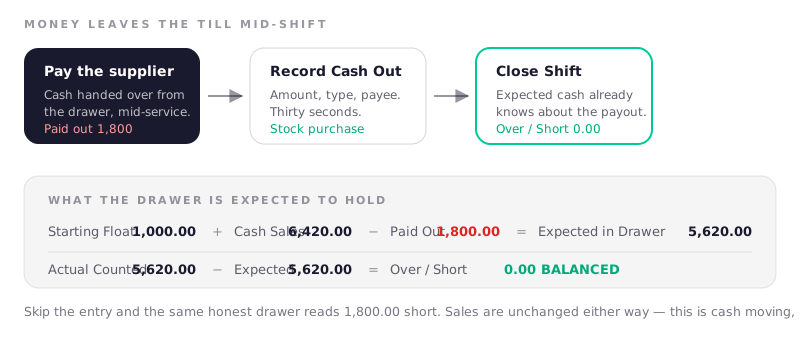
Expected in Drawer = Starting Float + Cash Sales − Cash Paid Out
The − Cash Paid Out line only shows on a shift that had payouts, so a normal day still reads as two lines and a total. Everything else about closing a shift is unchanged: count the cash, enter it, read the over or short.
Where it shows up afterwards
- Reports → Cash Out — totals for the period split by type, and a full history table with the date, type, payee, note, who recorded it and the amount. It follows whatever date range the report is on.
- Manager's Daily Report — the cash reconciliation table gains a Paid Out column, so the printed or emailed copy explains its own drawer figures.
- Expenses and profit — only for
Expensepayouts, which now arrive from the Expenses page rather than from here, and only once. They are already inside operating expenses; the Cash Out tab is showing you the same peso from a different angle, not charging it twice.
Frequently asked questions
Does a cash out reduce my sales?
No. It is cash movement, not a sale reversal. Revenue is what you sold; a payout is money leaving the box afterwards. Your sales figures, per-cashier totals and best-seller lists are all untouched.
Should I use Cash Out or the Expenses page?
For a bill, always the Expenses page — whatever paid
for it. Its Paid from picker is where the till comes in: choose
Register drawer and the payout is recorded here for you. Choose e-wallet, bank or
your own pocket and no payout is written, because the drawer was never involved.
Cash Out is for money leaving the till that is not a purchase at all: an owner
withdrawal, or an Other.
I used takings from a previous day. Is that a cash out?
No — and this is the one that catches people. Money that left the drawer days ago and has been sitting in an envelope is no longer in the till, so paying for 30kg of chicken out of it moves nothing in today's register. Record a payout and the drawer will read over by that amount at close.
Restock the ingredient and mark it Cash on hand instead. See
Cash on hand for the pile that money belongs to.
Why does my expense appear in two places?
Because it is two facts about one payment: an expense against profit, and cash
that left the drawer. Marking an expense Register drawer records both from one
form, and the Cash Out tab notes this on the page itself. It is counted against
profit once.
I recorded the wrong amount — can I delete it?
There is no delete button; a payout is a record, like a closed shift. Record the correction as a note when you close the shift, so the over or short figure has its explanation attached. If the amount is significant, contact us.
The owner took ₱2,000 and put ₱2,000 back an hour later. What do I record?
Nothing, if it genuinely came back before the drawer was counted — the till
balances by itself. Record it if the money came back on a different day, or if
you want the movement visible: an Owner withdrawal on the day it left, and a
note at close on the day it returned.
Can a cashier see how much has been paid out today?
Yes. Paid out today and its running total are visible to whoever is on the screen. It is only the expected-drawer figure that is gated.
Next: discounts and promos.