Daily operations
Start and close a shift
Open the till with a counted float, take orders against it, then close by counting the drawer — and understand exactly what the over or short figure is telling you.
4 min read · Updated August 27, 2026
A shift is the container every order belongs to. It exists so that at the end of the day you can answer one question honestly: does the cash in the drawer match the cash the system says should be there?
Without a shift, the till will not take an order. That is on purpose.
Start a shift
Go to POS → Start Shift. Count the money physically in the drawer right now and type it into Starting Float (₱). Add a note if something needs explaining — a float short because of a change run, for example.
The screen also shows the previous shift for reference only, so a cashier can see what the drawer closed at last time without being able to change it.
Count the float properly. A guessed float makes the closing figure meaningless, and a meaningless closing figure is worse than none — it teaches everyone to ignore it.
During the shift
Every order is tagged to this shift and to the cashier who took it. That is what makes per-cashier figures work in the Manager's Daily Report and in reports.
You can check progress at any time under POS → Daily Sales, which lists each order with its time, cashier, payment method and total, and can be filtered by user.
Close the shift
Go to POS → Close Shift. Count all the cash physically in the drawer, including the float you started with, and enter it as Actual Cash Counted.
Kasenso then does this:
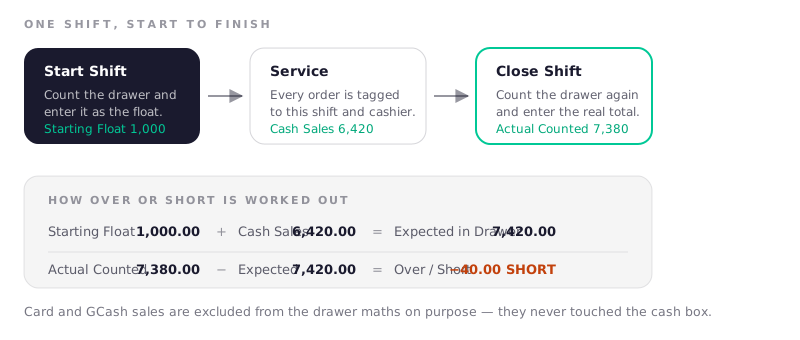
- Expected in Drawer = Starting Float + Cash Sales − Cash Paid Out
- Over / Short = Actual Counted − Expected
A positive number is an overage, a negative one is short. The close screen also shows the shift's orders, total revenue, discounts given and voids, so you are reconciling with the context in front of you rather than a bare number.
Add a note before confirming if anything explains the gap. Six months later that note is the only thing that will.
Reading over and short
A gap is information, not an accusation. Common causes, roughly in order of how often they turn out to be the answer:
| Symptom | Usual cause |
|---|---|
| Short by small odd amounts | Change given by hand instead of using the tendered field |
| Short by one item's price | A sale rung up but paid in cash that went astray, or an order missed |
| Over by a round amount | The float was entered wrong at open |
| Over or short by exactly one order | A card or e-wallet sale recorded as cash, or the reverse |
| Consistently short, same person | Worth a conversation — but check the four above first |
A shop with an honest team still runs a few pesos either way. What matters is the pattern over a week, not one evening.
One shift at a time
If the till says Previous Shift Not Closed, someone finished a day without closing. Close that shift first — count the drawer as it is now and note what happened. Leaving it open means the next day's sales pile into yesterday's figures and both days become unreadable.
Build the habit: nobody goes home until the shift is closed.
Frequently asked questions
What should the starting float be?
Enough small notes and coins to make change through your busiest hour, and no more. Most small shops settle between ₱500 and ₱2,000. Whatever you choose, use the same figure daily — a constant float makes an unusual closing number stand out immediately.
Why are card and e-wallet sales not in the expected drawer total?
Because that money never entered the cash box. The drawer calculation only counts cash, so it measures exactly one thing: whether the physical cash balances. Card and e-wallet sales still count as revenue everywhere else in your reports.
Can two cashiers work the same shift?
Yes. Orders record who took them, so a shift can span several people and the Manager's Daily Report still breaks performance down per cashier. The drawer, though, is counted once at open and once at close — if two people need separate drawers, run separate shifts.
What if I close a shift with the wrong counted amount?
A closed shift is a record and is not editable. Note what happened, and if the error is significant, contact us. The practical fix going forward is to count twice before confirming — the screen shows the expected figure, so a large gap is a prompt to recount rather than to confirm.
Do I have to close the shift every day?
Yes, and it is the single habit that makes everything else trustworthy. An unclosed shift blocks the next one from starting and merges two days of sales into one meaningless block.