Daily operations
Keep selling when the internet drops
Orders taken during an outage are held on the device and upload themselves when the signal returns — here is what the banner means and the one thing not to do while it is showing.
3 min read · Updated August 27, 2026
Brownouts happen, mobile data drops, and the shop's connection picks the busiest hour to fail. Kasenso is built for that: the till keeps working and catches up afterwards.
What happens when the connection goes
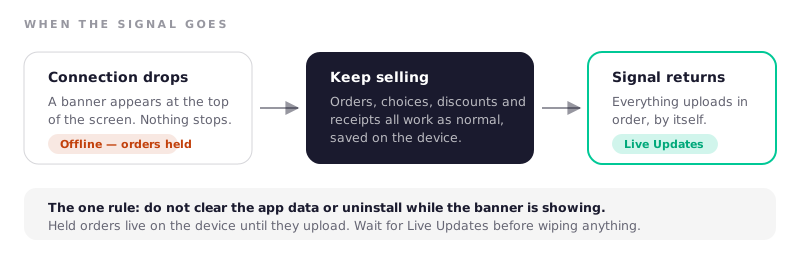
A banner appears at the top of the screen telling you the connection state. The till carries on — you can take orders, apply choices and discounts, take payment and print receipts, exactly as normal. Orders are held on the device.
When the connection returns, everything uploads in order without anyone doing anything, and the banner goes back to Live Updates. Reports and stock levels catch up on their own.
The one rule
Do not clear the app data, uninstall the app, or wipe the browser's site data while the banner says you are offline. Held orders live on the device until they upload. Wiping the device before they sync destroys them, and there is no copy anywhere else yet.
Wait for Live Updates before doing anything drastic to the device. If a tablet is playing up mid-outage, the safe move is to leave it alone and use a second device rather than to reinstall.
What still needs a connection
Some things genuinely cannot work without the network:
- Signing in. An already-signed-in device keeps working; a fresh sign-in needs a connection. If you know an outage is coming, make sure the till is already signed in.
- Seeing another device's orders. Two tills offline at once cannot see each other's sales until both have synced.
- Reports and analytics, which read from the cloud.
- Anything cloud-side — the online store, daily report emails, KAISHA.
Working with two devices offline
If you run two tills and both go offline, each holds its own orders and both upload when the connection comes back. Totals will be right afterwards.
What you should not do is count the drawer against on-screen totals in the middle of an outage while a second device is still holding orders — those sales have not reached the shared picture yet. Close shifts once everything is synced.
After an outage
Two quick checks once the banner turns green:
- POS → Daily Sales — the order count matches what you actually served.
- Inventory — stock deducted for the orders taken during the outage.
If both look right, nothing else needs doing. Close shifts as usual.
Frequently asked questions
Does Kasenso work without internet?
Yes, for taking orders. A device that is already signed in keeps selling, printing and holding orders through an outage, and uploads them automatically when the connection returns. Signing in fresh, and anything cloud-based like reports, needs a connection.
Will I lose orders taken during a power or internet outage?
Not unless the app's data is wiped before it syncs. Held orders sit on the device until they upload, so the only way to lose them is to uninstall or clear app data while the offline banner is showing.
How long can Kasenso stay offline?
There is no fixed limit — the device holds orders until it reconnects. In practice, get back online the same day: a device holding a day of unsynced sales is a single point of failure, and no report can see those sales until they land.
Do receipts still print when offline?
Yes. Bluetooth printing on Android happens entirely on the device and does not touch the network, so receipts print through an outage exactly as normal.
Can I close a shift while offline?
You can, but it is better to wait until the banner shows Live Updates, particularly if a second device is also holding orders. Closing against totals that have not finished syncing produces a drawer figure you will have to re-examine later.