Stock and costs
Track inventory and stock levels
Add your raw ingredients with costs and thresholds, link recipes so sales deduct stock automatically, and read the low-stock and expiry warnings before they cost you a service.
4 min read · Updated August 27, 2026
Inventory in Kasenso tracks raw items — chicken by the kilo, rice by the sack, cups by the piece — not finished dishes. Dishes consume raw items through their recipes, which is how a sale at the till turns into a stock movement without anyone typing anything.
Add an item
Under Inventory → Add, each item needs:
- Item Name — the ingredient as your supplier writes it on the invoice.
- Stock Category — for grouping and filtering.
- Unit — kg, g, L, mL, pc. Pick one per ingredient and never mix. Mixed units are the single most common cause of a stock count that drifts.
- Initial Stock — what is on the shelf right now.
- Cost Per Unit — what you pay. This is what makes food-cost and profit figures real rather than decorative.
- Low Stock Threshold — the level at which you want to be warned.
- Expiry Date — optional, for perishables.
- Supplier — optional; see suppliers.
Set the threshold to what you need for one more day of trading, not to zero. A warning that arrives when you have run out is not a warning.
Let sales deduct stock
This is the part that pays for the setup.
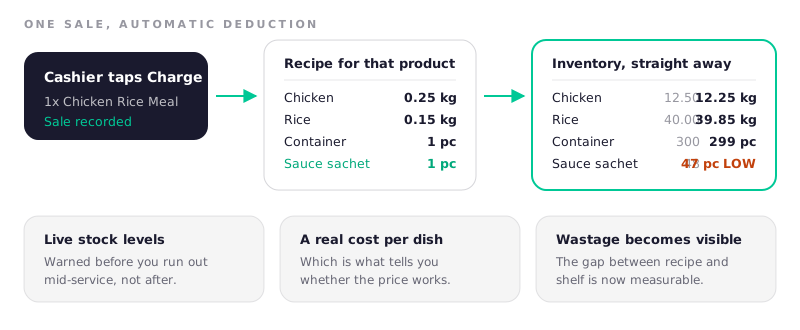
Under Inventory → Recipes, pick a product and list what one serving consumes. Every sale then deducts those quantities automatically. The recipe screen shows, per product:
- Recipe Cost — the ingredients.
- Packaging Cost — cups, containers, utensils.
- Operating Overhead — an allowance per serving.
- True Cost against the Selling Price, with Gross Margin, Net Profit and a Cost %.
The screen flags 40%–60% as the sustainable band for cost as a share of price. Below 40% and you may be leaving money on the table or under-portioning; above 60% and the dish is not carrying its share of your rent.
Recipes also refuse to save with unit mismatches — a recipe line in grams against an ingredient stocked in kilos is caught before it silently corrupts a month of stock counts.
Read the warnings
The Inventory page and the sidebar badge flag items in three states:
| Badge | Meaning |
|---|---|
| LOW STOCK | At or below the threshold you set |
| REFILL NEEDED | Needs restocking now |
| EXPIRING SOON | Within the lead time set in Settings |
| EXPIRED | Past its date — pull it and record it as wastage |
The expiry lead time is a single business-wide setting under Settings → Inventory Alerts. Match it to how long it takes you to actually use something up.
Restocking
When a delivery arrives, update the item's stock. Kasenso keeps the movement history, and Inventory → Daily Item Activity shows each item's day as four columns: used from sales, restocked, wasted, and the net change.
That table is the fastest way to answer "where did it all go?" — the difference between what the recipes say you used and what is actually on the shelf is wastage you have not recorded.
Sorting and stock value
The list can be sorted by name, by recently restocked, or by least recently restocked — the last of which is the one to use monthly. An item nobody has restocked in two months is either dead money on a shelf or a recipe that is quietly not deducting.
Total Stock Value at the top is your capital sitting in the storeroom, priced at your unit costs.
A monthly habit
Count physically once a month. Compare the count to what Kasenso says, adjust the figures, and record the gap as wastage rather than quietly correcting it. The gap is the number worth watching; a shop that adjusts silently never learns anything from it.
Frequently asked questions
Does Kasenso deduct stock automatically when I make a sale?
Yes, for any product with a recipe. Selling the dish subtracts each recipe quantity — including packaging — from the linked inventory items straight away. Products without a recipe are sold as-is and do not move stock.
Should packaging be in the recipe?
Yes. Cups, lids, containers, bags and utensils are real costs and they are the most predictable thing you will ever run out of. Leaving them out understates your cost per dish and removes your only early warning.
What is a good food cost percentage?
Kasenso flags 40%–60% of the selling price as the sustainable band for total cost including packaging and overhead. Where you should sit inside it depends on your rent and volume; consistently above 60% means the price or the portion needs to change.
Why is my stock count wrong?
The usual causes, in order: mixed units on one ingredient, a recipe missing packaging, deliveries not entered, and wastage not recorded. Check them in that order — mixed units account for most of it.
Can I track stock without setting up recipes?
Yes. You can update quantities by hand and still get low-stock and expiry warnings. What you lose is automatic deduction, a true cost per dish, and any measurement of wastage.
Next: recipe yields.