Getting started
Choices — sizes, flavours and add-ons
Use choice groups so one product covers every size, flavour and add-on, with its own upcharge and its own stock deduction, instead of a dozen near-identical menu entries.
4 min read · Updated August 27, 2026
A choice is a question the cashier answers while adding an item to the cart: which size, which flavour, how spicy, any add-ons. Choice groups exist so your product list stays short while your menu stays wide.
This is the single setting that most affects how fast your till feels, and how much work a price change costs you later.
Why not just make more products?
Because every combination multiplies. Three sizes and four flavours is twelve products, and a price rise means twelve edits — of which you will get eleven right.
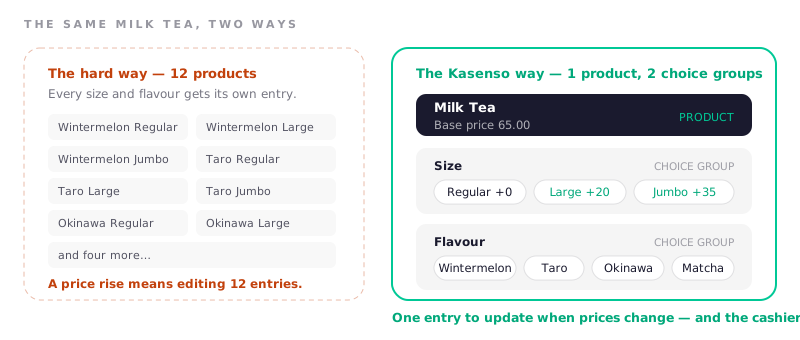
The rule of thumb: if the thing changes the price or the stock used, it belongs in a choice group. If it changes neither — "no onions", "extra napkins" — it is a note on the order, not a choice.
Create a choice group
Go to Choices in the sidebar. The left column lists your groups; the right column holds the options inside the selected group.
- Add a group and name it as the cashier would say it out loud: Size, Flavour, Spice level, Add-ons.
- Add each option inside it, with its upcharge. Leave the upcharge at zero for options that cost the customer nothing.
- Attach the group to the products it applies to.
Upcharges are additions to the product's base price, so a ₱65 milk tea with a Large +₱20 option rings up at ₱85. You maintain the ₱65 and the ₱20, not the ₱85.
Make choices deduct their own stock
An option can consume stock of its own, which is what makes upsizing honest in your inventory. On each option you can set:
- The inventory item it draws from — the larger cup, the extra shot, the second patty.
- Quantity per unit sold — how much of that item one selection uses.
- The unit — matching the unit on the inventory item itself.
Now a Jumbo sale deducts a jumbo cup rather than a regular one, and your cup count stops drifting. This is the part people skip and then cannot explain why packaging always runs out early.
Optional choice slots
Not every question has to be answered. A choice group can be marked optional, which lets the cashier skip it and keep moving — right for Add-ons, wrong for Size, where an unanswered question means an unpriced item.
A good default: anything that determines the price is required, anything that adds to it is optional.
Upsize pricing on a product
Separately from choice groups, a product can carry an Upsize Add-on Price. It is the quick version of a size choice for shops that only ever offer one step up, and it is reported on: Reports → Extra Revenue from Upsize shows what upsizing earned you and which product gets upsized most.
If you have three sizes, use a choice group. If you have exactly two, upsize pricing is fewer taps.
Check it at the till
Open Point of Sale and add the product. You are checking that the prompts appear in the order a cashier would ask them — size before flavour, food before add-ons — and that the cart shows the chosen options as lines underneath the item with their upcharges visible.
A cashier who can see the upcharge on screen can answer "why is it ₱85?" without calling you over.
Frequently asked questions
What is the difference between a choice and a separate product?
A choice is a variation of one product that shares its name, its category and its base price. A separate product is a different thing to sell. Use a choice whenever the customer would say "the same but larger" — and a separate product when they would say a different name.
Can one choice group be used by several products?
Yes, and that is the point. A Size group built once can be attached to every drink you sell, so adding a new size later is one edit rather than one edit per drink.
Do choices show on the printed receipt?
Yes. Selected options print as lines under their item along with any upcharge, so the customer can see why the total is what it is, and so a reprint is readable when someone queries an order later.
Can an add-on reduce the price instead of adding to it?
Upcharges are designed to add. For anything that reduces what the customer pays, use a discount or promo — it is reported separately, which means your discount total actually reflects money given away rather than being buried inside item prices.
Will changing an upcharge affect past orders?
No. Orders keep the prices they were sold at. New upcharges apply from the moment you save them onward, so your sales history stays a record of what actually happened.