Stock and costs
Cash on hand: the money you restock from
Track the takings you keep outside the till — where they came from, what you spent them on, and whether the pile still matches what the system thinks it should be.
6 min read · Updated September 2, 2026
Five days of takings are in an envelope at home. On Saturday you take ₱4,500 out of it and buy 30kg of chicken. Nothing came out of the register — the register was never involved — so there is nothing to record under Cash Out, and the shift that day should count perfectly.
But that envelope is real money, it is business money, and until now the app had no idea it existed. Cash on Hand is where it lives.
The two piles
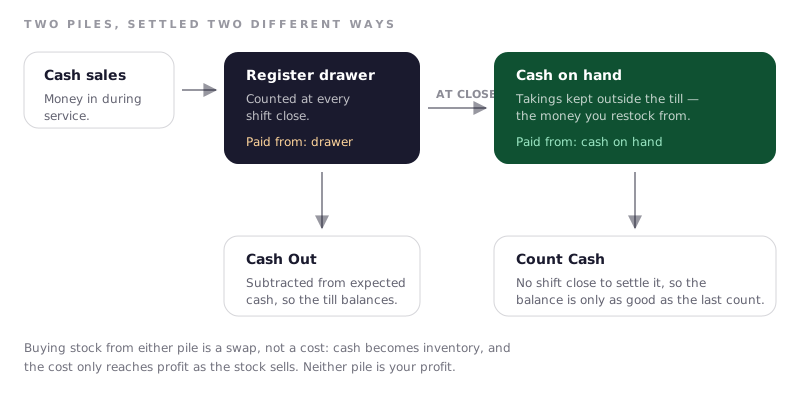
Your business keeps cash in two places, and they are settled in different ways.
| Register drawer | Cash on hand | |
|---|---|---|
| What it is | The till during service | Takings kept at home, in a safe, anywhere else |
| Money in | Cash sales | What you lift out of the till at close |
| Money out | Cash Out payouts | Restocks and expenses marked Cash on hand, and withdrawals |
| Settled by | Counting at every shift close | Counting whenever you choose |
Confusing the two is the most common mistake. Recording a payout for money that came from the envelope makes the drawer look over by that amount at close — you have told the system the till is light when it is not.
Where did the money come from?
Every restock and every expense now asks one question before it saves: Paid from. Five answers, and only two of them touch a cash balance.
| Answer | What it means |
|---|---|
| Register drawer | Cash from the till, right now. Also writes the Cash Out entry for you. |
| Cash on hand | From the envelope. Comes off the balance on this page. |
| E-wallet | Paid by e-wallet. Recorded, but no cash moved. |
| Bank / card | Paid by transfer or card. Same. |
| Owner's own money | Your personal money, not the business's. |
Answering Register drawer on a restock does both jobs at once: the stock goes into inventory and the drawer payout is recorded in the same save. You no longer have to remember to visit Cash Out separately, and the two can no longer disagree.
The app remembers your last answer, because restocking is habitual. It never guesses Register drawer for you — a wrong guess there invents a payout that never happened and leaves an honest shift reading over.
Getting money into the pot
At shift close there is a new optional box: Cash Taken Out of the Till.
Count the drawer as you always have, then type how much you are bringing home or to the bank. The rest stays as tomorrow's float. That number is the only inflow Cash on Hand has, and it is asked at close because that is the one moment somebody is already holding the money and counting it.
Leave it blank on days the cash stays in the drawer.
Taking money out for yourself
Cash on Hand → Take Out records money leaving the pot for you rather than for the business — tuition, a personal bill, anything that is not a cost of running the shop.
It is worth thirty seconds because the alternative is worse. Money that leaves unrecorded does not disappear from the app quietly; it turns up as an unexplained shortage the next time you count, and after that happens twice you stop believing the over/short figure at all.
This is not an expense and it does not reduce your profit. Drawing money out of your own business is not a cost of running it — you are moving your own money, not spending the shop's. Only the balance on this page changes.
If the amount is more than the balance shows, the app still records it and tells you to count afterwards. The money is already gone by then; refusing the entry would only make the balance wronger.
Count it, or do not trust it
The drawer is honest because it is counted every single shift. An envelope at home has no such moment, so a balance calculated from records alone slowly stops being true — a taxi fare nobody wrote down, change that never went back, a cousin sent to buy soy sauce.
Cash on Hand → Count Cash is that moment. Count the actual money, type the total, and the app shows you the gap between what it expected and what is really there. Saving the count makes the counted amount the new starting point, so an unexplained ₱180 is absorbed once instead of being carried in every future figure.
Until you have counted at least once, the page says so plainly. Believe the warning rather than the number.
How often is up to you — weekly, or simply every time you are about to restock and want to know what you can afford.
Spending it is not a loss
Buying stock with cash on hand does not reduce your profit, and the balance dropping is not money disappearing. You swapped one thing you own (cash) for another (chicken). The cost lands later, as cost of goods, when the chicken sells as meals.
This is why the balance falling by ₱4,500 while profit does not move is correct rather than a bug. It is also why the pile of cash is a poor measure of how well the month went: most of it is puhunan waiting to become stock again. The net profit figure in your reports already handles this properly.
Common questions
I bought stock with revenue cash. Do I use Cash Out?
No. Cash Out only explains a shortfall in the register during a shift. Restock the ingredient and mark it Cash on hand. If you record a payout instead, the drawer will read over by that amount at close, every time.
Is an owner withdrawal the same as the one in Cash Out?
Same idea, different pot. Cash Out's Owner withdrawal takes money from the
register during a shift, so it comes off the expected drawer total at close.
Take Out takes it from the envelope instead, which the drawer knows nothing
about. Use whichever pot the money actually came from.
Can my cashier see this?
No. The page and the counting are admin-only. Cashiers still choose a payment source when they restock, so nothing about their day changes.
I marked an expense with the wrong source.
Delete it and add it again. The source is locked once saved, because a Register drawer expense also wrote a drawer payout — quietly switching it later would charge the same peso to two different balances.
Why is my balance zero when I know there is money at home?
Because the app only knows what it has been told, and it starts from nothing. Run one count and type what is actually in the envelope. From that point on the balance is real.
Does any of this change my sales or profit figures?
No. Payment sources are about which pocket paid, and profit does not care which pocket paid. Nothing here touches revenue, and no expense is counted twice.