How to sell merch at a wrestling show without a long line at the table
October 25, 2026 · Jott Myth · 9 min read
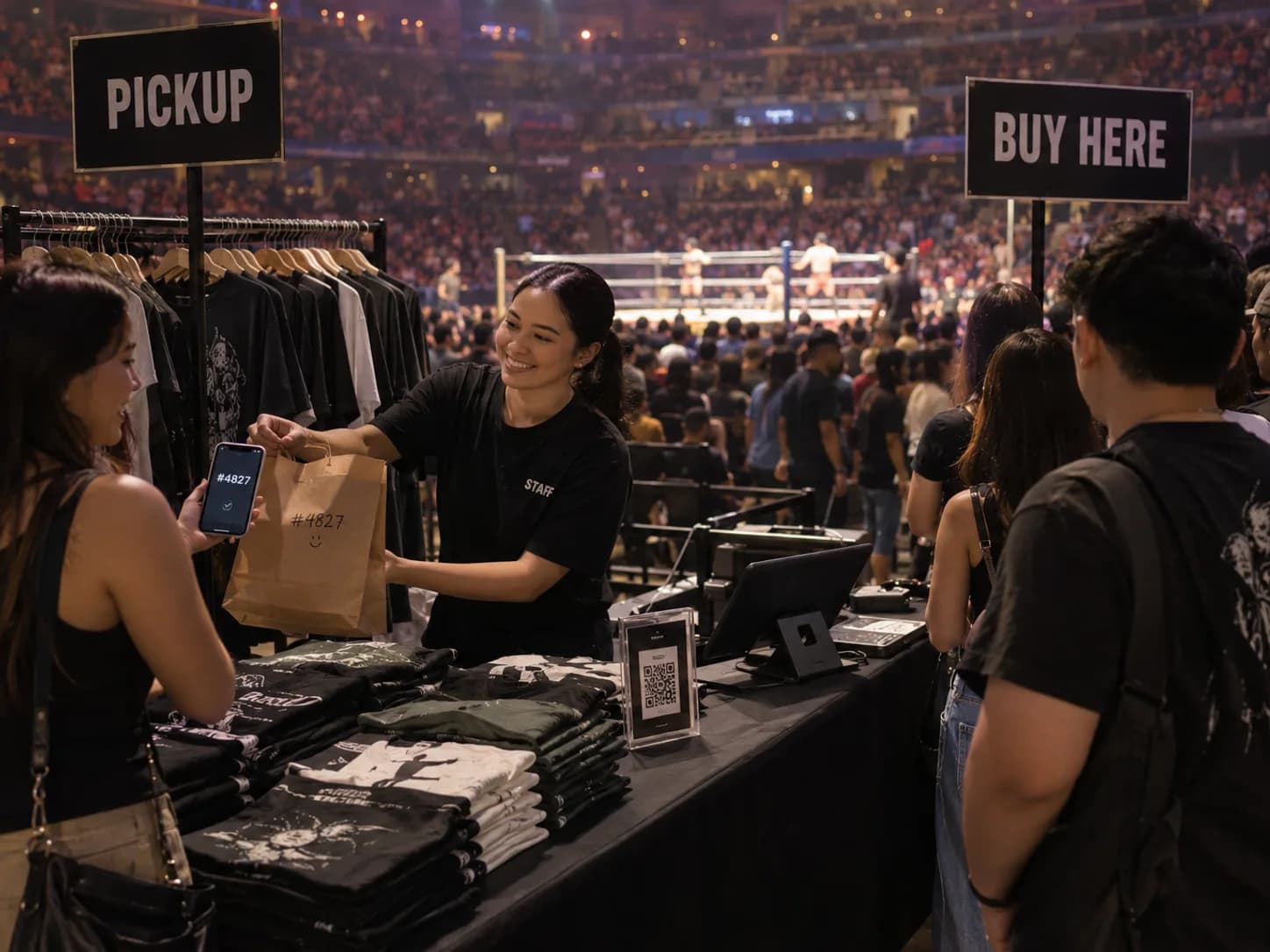
In short: the merch line at a live show is long because every sale happens in the same three short windows, and each one takes a couple of minutes. Take part of the selling out of those windows. Let fans order and pay online before the show or from their seat, and collect a bagged order at a pickup lane. A pickup takes seconds, so the same table serves more people.
Ask anyone who runs merch at a wrestling show. The table is quiet during the matches. Then the intermission bell rings and sixty people arrive at once, each asking for a different shirt in a different size. Someone wants change for a large note. Someone else can't decide between two designs. The second half starts, and half the line goes back to their seats without buying anything.
It isn't only wrestling. Gigs, comic conventions, roller derby, boxing nights and school concerts all have the same problem: lots of fans, a short break, and one table.
How do you sell merch at a wrestling show without a long line?
Split buying from collecting. Put your merch on an online store, let fans order and pay before the show or from their seat, and pack each order in a bag labelled with its order code. At the table, run a separate pickup lane where fans show the code and take the bag. Walk-up buyers get a shorter line too.
The rest of this post works through why the line forms, what it costs, and how to set this up with Kasenso's online store.
Why does the merch line get so long?
Because nearly all your selling is squeezed into a few minutes. Fans don't leave their seats during a match, so they buy at three moments:
- Before the first bell, after doors open.
- At intermission.
- After the main event, on the way out.
Add those together and a show might give you about 65 minutes of selling time. Every walk-up sale in that time goes through the same steps: ask what designs there are, ask for a size, wait while you find it in a box, pay, wait for change. Two minutes per customer is normal. Fifteen people in front of you is a 30-minute wait, and nobody waits 30 minutes during a 15-minute intermission.
How much does a long merch line cost you?
More than it looks, because the people who give up never show in your numbers. Here is a worked example for one show:
| Without pre-orders | Half pre-order | |
|---|---|---|
| Fans who want a shirt | 100 | 100 |
| Walk-up sales at 2 minutes each | 100 × 2 = 200 minutes | 50 × 2 = 100 minutes |
| Pre-order pickups at 30 seconds each | 0 | 50 × 0.5 = 25 minutes |
| Table time needed | 200 minutes | 125 minutes |
| Table time available: 2 sellers × 65 minutes | 130 minutes | 130 minutes |
| Fans who leave without buying | 35 | 0 |
Without pre-orders, 130 minutes of table time serves 130 ÷ 2 = 65 people, so 35 leave. At $25 a shirt, that is 35 × $25 = $875 of sales lost. If a shirt costs you $10 to make, it is 35 × $15 = $525 of profit lost, at one show.
With half the fans ordering ahead, everyone gets served by the same two people. Those numbers are an example, not a promise. Time your own table for one show and put your own figures in.
How do pre-orders work for event merch?
The fan orders from a link on their phone. They pick the design and size, choose pickup, and get an order code on screen. You see the order on your till, pack it into a bag, and write the code and their name on it. At the show, they come to the pickup lane, show the code, and leave with the bag.
There are two times a fan can order:
- Before the event. Share the store link wherever you sell tickets or announce the card: your page, the event listing, the ticket confirmation message. Orders that come in days ahead can be packed at home, so they cost you no table time at all on the night.
- During the event, from their seat. Put a QR code of the store link on posters, on the big screen, and in the ring announcer's script before intermission: "skip the line, order from your seat and collect at the pickup lane." While the match is on, you pack. When the bell rings, the bags are ready.
The second one needs the fan's phone to have signal in the venue. The first one doesn't, which is one more reason to push pre-orders hard before the show.
How do I set up a merch store with Kasenso?
- Switch to retail. Under Settings → What You Sell, choose Retail goods, so each product keeps its own stock count. The retail guide covers the details.
- Add each design once, with its sizes. In the full product form, switch on Sizes, colours and other options and add Size: S, M, L, XL. Each size gets its own count, and a fan picks the size after tapping the shirt. The retail guide shows how. A Bundle / Combo works for a shirt-and-poster deal.
- Switch on the store. Under Settings → Online Store, turn on Accept Online Orders and copy your link. Kasenso gives you the link; turn it into a QR code with any free QR code maker.
- Tell fans where to collect. In Note for Customers, write the pickup instructions: "Collect at the merch table, pickup lane on the left. Show your order code."
- Take payment ahead. Set up your e-wallet or bank account under Pay Ahead, and switch on Customers must pay ahead.
That last step matters more for merch than for food. A pre-order that has been paid gets collected. An unpaid one ties up a shirt in a bag that you could have sold to someone in the line.
How should the merch table run on the night?
Run two lanes, with clear signs:
- Pickup lane. Pre-orders only. Bags sorted by order code or by name in a box, so finding one takes seconds. One person can run this lane alone.
- Buy here lane. Walk-up sales on the till as normal.
A few habits keep it working:
- Accept and pack orders between matches. Online orders wait on the till until you tap Accept. If you take payment ahead, check the money arrived first, as the Pay Ahead guide explains.
- Keep the counts right. The store greys out a size when its count reaches zero and won't take an order for more than are left. That only helps if the counts match the boxes, so enter your stock before doors open.
- Plan for weak signal. Big venues often have poor mobile data. Walk-up sales on the till work offline, but the online store doesn't: new orders only reach the till when it has a connection. Bring a hotspot, or pack every pre-order before doors open.
What should you do after the show?
Open your reports and look at every product you sold. Each design and size is its own line, so you can see that the medium black shirt sold out by intermission and the XXL white one barely moved. That is the order you place for the next show.
The fans who ordered online are now in your customer list, with their phone numbers. Next time you announce a show or a new shirt design, you know who bought last time.
Frequently asked questions
How do you stop long lines at a merch table?
Move part of the selling away from the busy moments. Let fans order and pay online before the show or from their seat, then collect a bag labelled with their order code at a separate pickup lane. A pickup takes seconds instead of a couple of minutes, so the same table serves more fans.
Can fans buy merch from their seat at a live event?
Yes, if the merch is on an online store. Fans scan a QR code on a poster or the big screen, choose a design and size, pay, and collect at intermission. They need mobile signal in the venue to order, and your till needs a connection to receive the order.
How much merch can a table sell at one show?
Divide your selling time by the time each sale takes. Two sellers with 65 minutes of selling time and two minutes per sale serve 65 fans. Pre-orders picked up in 30 seconds each stretch the same time much further. Time your own table at one show to get your real numbers.
Should merch pre-orders be paid in advance?
Yes. An unpaid pre-order may never be collected, and the shirt in that bag can't be sold to anyone else. With Kasenso's Pay Ahead, fans send the money to your e-wallet or bank account and upload a screenshot. You check the payment arrived before accepting the order.
How do I make a QR code for my online merch store?
Copy your store link from Settings → Online Store in Kasenso, then paste it into any free QR code maker and download the image. Print it on posters and table signs, show it on the venue screen, and add the link to ticket confirmations and event pages.
What happens if a shirt size sells out online?
When a shirt is set up with sizes in Kasenso, a size whose count reaches zero is greyed out as sold out on the online store, and fans can't order more than are left. At the merch table the till still sells it, in case the box holds one the count missed.
Does this work for concerts and conventions too?
Yes. Any event where lots of people want to buy in the same short break has the same problem: concerts, gigs, comic conventions, sports games and school shows. An online store for pre-orders with a separate pickup lane works the same way at all of them.